Sign inStart free

Free during the beta

A virtual office that feels like the real one

Walk over to talk, close the door to meet, and see who's in. Your whole team in one 3D office, right in your browser.

Start freeSee how it works

Nothing to install. Every feature, for your whole team.

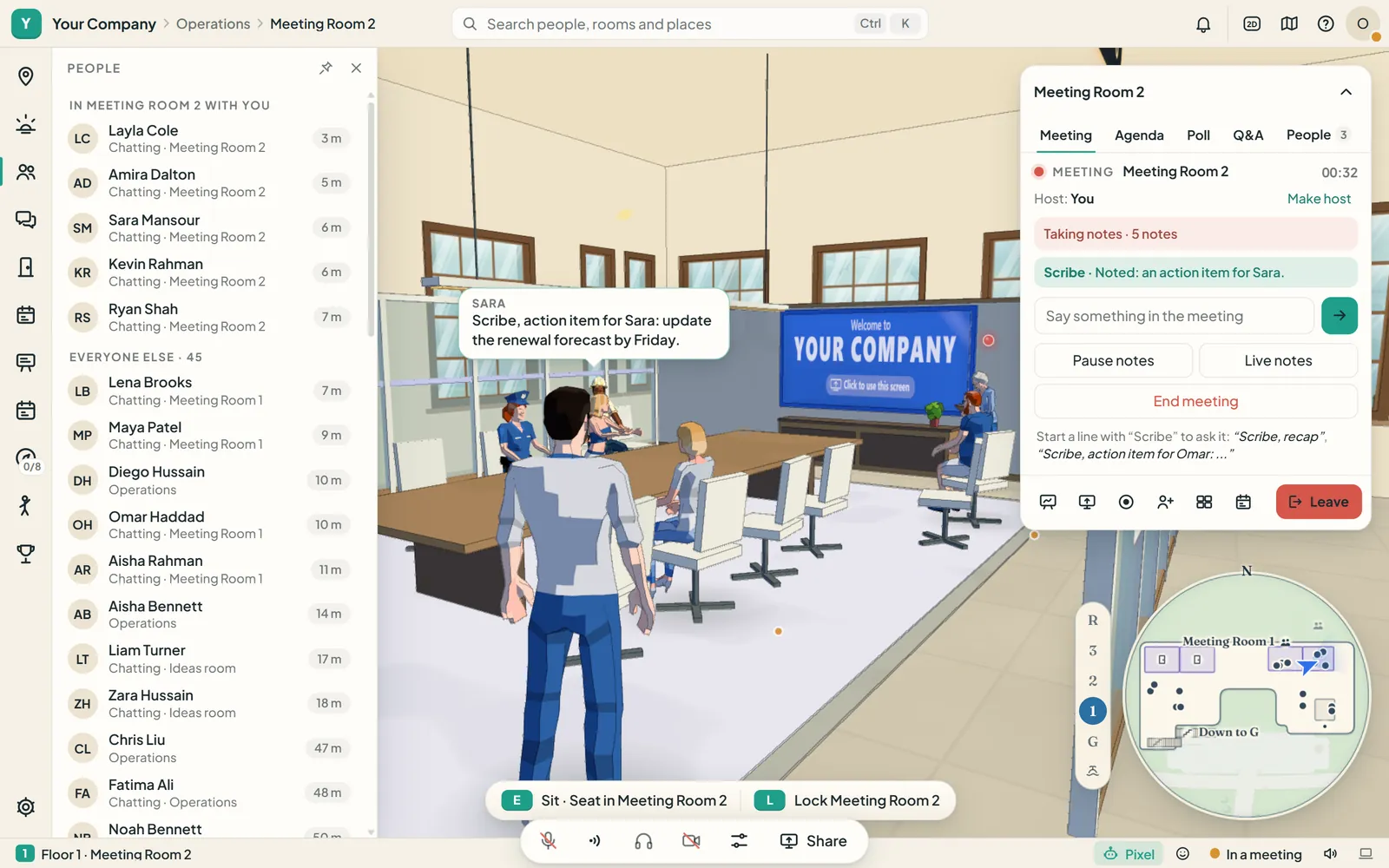
Alsa World in a meeting room: colleagues round the table in the 3D office, the People panel listing who is in the room, the room's meeting panel with the Scribe taking notes, and the call controls along the bottom.

Why it works

The easy parts of the office, back

  • Walk over to talk

    Go up to a colleague and just talk. The people near you hear you; the people across the floor don't.

  • See who's in

    Everyone's status at a glance: who is near you, who is in a meeting, and who is heads down.

  • Nothing to install

    It runs in the web browser on your computer. Invite your team by e-mail, and they're in.

Features

One office for the whole working day

Presence

See who's around, and walk over

The People panel shows who is near you, how far away and what they're doing. Press Ctrl+K to find anyone, then walk over and talk.

  • A soft ring on the floor shows how far your voice carries.
  • Available, In a meeting, Focus, Do not disturb or Away.
  • Camera and screen sharing when you need them.
The Operations floor in Alsa World: the People panel lists who is near you, how far away and what they're doing, while colleagues work at their desks and Pixel waits beside you.

Meetings

Meetings that leave notes behind

Every meeting room has a whiteboard that keeps what you drew, and the Scribe, who writes down what was decided. The minutes are saved for the people who were there.

  • An agenda, a poll and questions in the room's panel.
  • Present your screen on the room's display.
  • Go back to an earlier version of a whiteboard.
A meeting room's whiteboard open in Alsa World: a retrospective with sticky notes in three columns, and the drawing tools along the bottom.

Your team's day

The whole day, on the office walls

A team board for what everyone is working on, a notice board and kudos for the whole company, and an events board with a reminder before each event starts.

  • Book a meeting room for a time, and the door shows it.
  • A stand-up board for every team: yesterday, today and what's in the way.
  • My day keeps your meetings and tasks together.
The team board in Alsa World: cards in To do, In progress, In review and Done, each with the colleague it belongs to.

Admin and security

Private when it needs to be

Lock a meeting room, and only the people inside hear you; people outside knock. Your office is open to your company's members only.

  • An admin page for your members and their roles, departments, e-mail domains and the audit log.
  • Colleagues join by invitation, or by confirming an address on your company's proven domain.
  • A meeting is recorded only when someone presses Record, and everyone in the room is told.
A locked meeting room in Alsa World: the Private badge, the prompt to unlock the room, and the colleagues inside it.

Also in the office

  • Five floors

    Reception, a work floor with team desks, meeting rooms, a conference hall and a roof lounge.

  • Messages

    Direct messages, a channel for every room, and an activity feed for knocks, mentions and bookings.

  • Pixel

    A small robot that follows you about, and shows a newcomer round on their first visit.

  • The Commons

    A shared place where companies meet, with booths, events and a stage. Go only if you want to, as yourself or under an alias.

How it works

Three steps to your office

  1. Sign up and name your company

    Your office is ready as soon as your company has a name.

  2. Invite your team

    Invite people by e-mail, or prove your company's e-mail domain so colleagues can join by themselves.

  3. Walk in and work

    Open the office in your browser, find your team's desks and say hello.

Security

Security, in plain words

Your company's office holds its conversations and its plans. This is how we keep them yours.

  • Your company's data is walled off from every other company's by the database itself, not only by our code.
  • A locked room stays private: the server decides who is inside, and nobody outside can listen in.
  • Passwords are kept only as one-way hashes, and the most common ones are refused.
  • Alsa World doesn't record your calls. A meeting is recorded only when someone in it presses Record, and everyone in the room is told.
  • We use cookies only to keep you signed in and to protect your account (two-step sign-in, and noticing a new device). No tracking or advertising cookies. No analytics.
  • Everything travels encrypted, from the page to your calls.

Questions

Questions, answered

Is it really free?

Yes, during the beta. Paid plans are coming soon; if you'd like to talk about them, send us a note.

Do we need to install anything?

No. Alsa World runs in the web browser on your computer. There's nothing to download.

Who can come into our office?

Only your company's members: the people you invite, and colleagues who confirm an address on your company's proven e-mail domain.

How do we get started?

Sign up and name your company, and your office is ready. Invite people by e-mail, or prove your company's e-mail domain so colleagues can join by themselves.

Are our meetings recorded?

Not by Alsa World. A meeting's Record button saves a video of what the person recording sees, with their own microphone, on their own computer. Everyone in the room is told while it runs, and the door says so.

Do we have to go to the Commons?

No, the Commons is optional. You decide whether to go, and whether to use your name or an alias there.

Where is our data kept?

In Alsa World's database on our server, walled off from every other company's. Voice and video travel through our video provider between the people in a conversation; Alsa World doesn't record or keep them.

Pricing

Free during the beta

Alsa World is free while it's in beta: every floor and every feature on this page, for your whole team.

Paid plans are coming soon. Tell us what your company needs, and we'll write back.

Talk to the team

Tell us a little about your company. We'll answer at the address you give.

Up to 2,000 characters.

Your office is ready when your team is

Free during the beta, with nothing to install.

Start freeSign in